Updates to Rally in Q3 of 2026 support organizations as they bring more manual tasks into their managed media supply chains and as they extend their operations across more regions. With the scope of modern supply chains growing, operators need even more efficient ways to find, prioritize, and complete their work. Teams working across different regions and territories need responsive access to content and tools suited to specific language and localization requirements. The latest enhancements to the Rally media supply chain management platform address these needs by streamlining everyday manual tasks and by supporting effective management of increasingly global operations.
Usability improvements within Rally this past quarter simplify content review, work order management, and metadata entry, while integration updates strengthen control over API credentials and improve support for accessing media across regions. Alongside these enhancements, the Rally Application Services ecosystem continues to expand. New integrations for audio conforming, Japanese subtitle QC, and automated audio post-production bring more localization and podcast workflows into the supply chain.
Jump to:
Usability Enhancements
Preview: Nested Marker Categories in the Rally Player
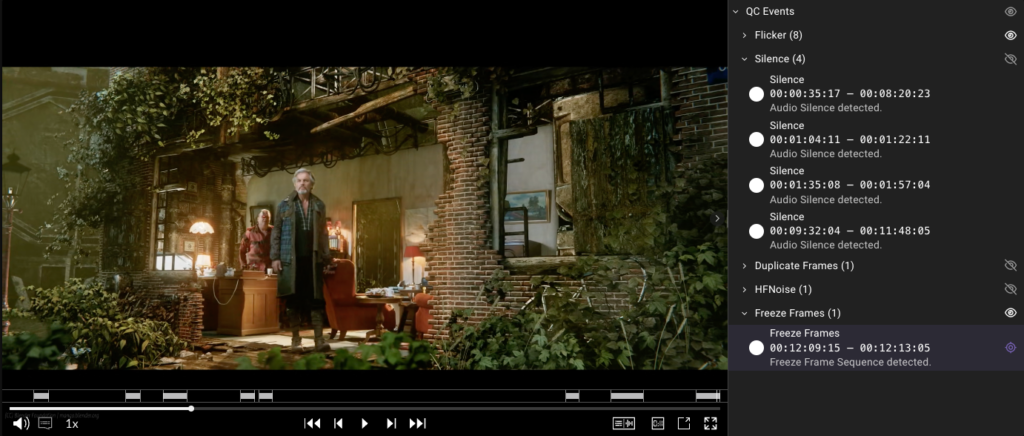
The Rally Player marker list now renders dot-notated event categories (such as Baton.Errors.Video.Flicker) as a nested tree of collapsible category levels. Matching the way Rally Access already displays these categories, this update gives operators a consistent, familiar experience across Adobe Premiere and the Rally Player. Because operators can collapse and expand each level to focus on the markers that matter, they can more easily review larger marker sets. Flat single-level categories continue to display as before.
Rally Access: Duration Field and From Playhead on Custom Timecode Fields
The Access marker and segment form now shows a Duration field calculated from the start and end timecode values. The Duration field updates automatically as either value changes, and if the duration itself is edited, the end timecode adjusts automatically to match it. Custom timecode-type fields in Access dynamic forms also gain the From Playhead button already available on the built-in start and end fields, so operators can capture the current frame with one click instead of typing in SMPTE timecode. Both changes apply automatically, without extra preset configuration.
Work Order: Priority Filtering and Changes After Assignment
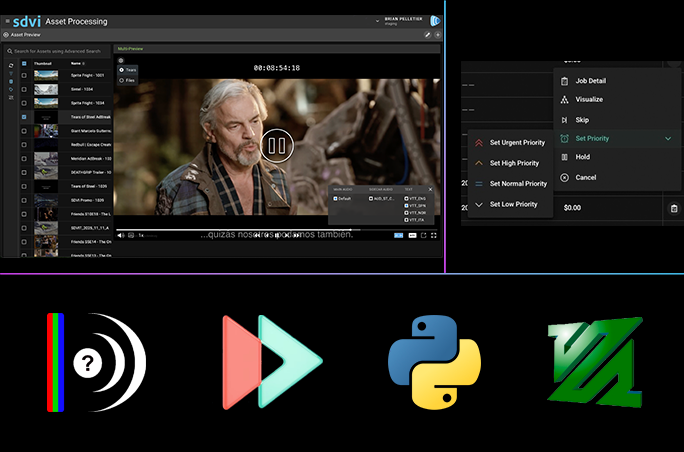
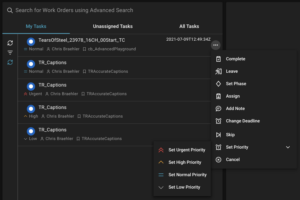 The Work Order widget now offers Priority as a multi-select filter — available on the Rally Work Order page, as well — so operators can focus on the highest-priority work and supply chain engineers can filter by priority via elastic query to build automated, priority-based views. The four user-settable levels (Urgent, High, Normal, Low) can be combined and applied alongside other active filters.
Work order priority can now be changed for any work order that has been assigned, rather than just those work orders that are not yet activated. So, if an operator activates a work order and then leaves it unfinished, a supervisor can elevate that work order’s priority so that another operator picks it up sooner. Helping to ensure that priority reflects current urgency rather than the state of a work order at activation, this update prevents stalled high-priority work from sitting unnoticed.
Work Order: Set the Initial Phase on Creation
Work order presets now support a defaultPhase setting, so newly created work orders start in the phase the supply chain intends rather than relying on an operator applying “Set Phase” to each item. The new defaultPhase setting sits alongside defaultUser and defaultGroup at the preset root, keeping default-assignment configuration in one place, and presets that omit it create work orders exactly as before.
Rally Gateway: Clearer Upload Navigation Warnings
The warning triggered when an operator navigates to a different page during an in-progress upload now explains that the upload will continue in the background and can be tracked in Recent Uploads. A warning also appears when operators attempt to close the browser tab during an active upload. Preventing an accidental interruption, this navigation warning gives operators clear next-step options and the confidence they can keep working without losing track of an upload.
Rally Gateway: Custom Tabs in the Asset Inventory Widget
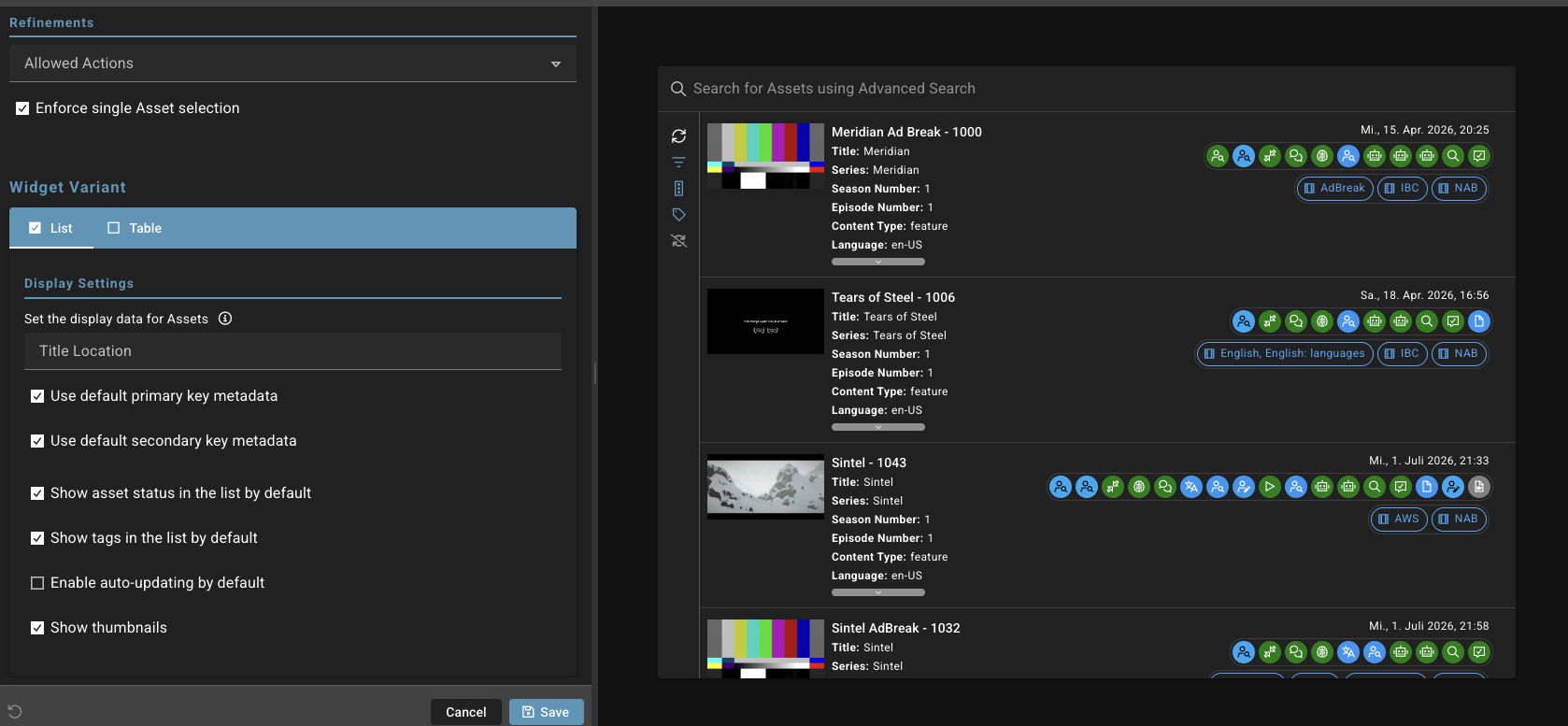
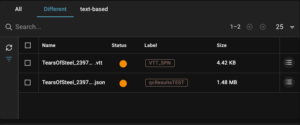 The Asset Inventory widget now supports custom tabs, each with its own filter configuration, so administrators can create purpose-built views — a “QC Reports” tab surfacing files with a particular tag, for example — that operators can reach in one click rather than rebuild a filter each time. Tabs filter by status, label, and tag, and a new file extension filter narrows a tab to specific file type, such as mxf. Tabs keep their own quick-search query as operators move between them. This approach is consistent with the preconfigured tabs already available on the Work Order widget.
Rally Gateway: Clickable URL Fields in the Metadata Edit Widget
The Metadata Edit widget can now render string fields as clickable links that open in a new tab, and read-only markdown sections on a form can display live values drawn from form content or asset metadata. As a result, operators can navigate directly to the external services referenced in asset metadata, while the stored value remains a plain string.
Metadata Widget: Clearer and More Consistent Read-Only Fields
Read-only fields in the metadata widget are now clearly legible and behave consistently across every field type. Values are rendered as genuinely read-only rather than disabled, so they no longer appear dimmed and hard to read — particularly in light mode. Object, group, and key/value fields properly block edits instead of just looking inactive. Date fields keep their calendar icons, radio groups ignore keyboard input, controls that did nothing have been removed, and read-only values are preserved when saved form data is imported. Together, these changes improve the accessibility of read-only forms.
Forms: Time Picker for Time Fields
Time fields in forms now open a clock picker for hour, minute, and AM/PM, matching the pickers already used for Date and Date Time fields, so operators no longer have to type a time value into a plain text box. The clock picker is available across Rally, Gateway, Access, and Preview, and saved values are stored with seconds for consistency with the Date Time field.
Rally: Integer Field Type for JSON Schemas
Whole-number fields can now be defined as a true integer type wherever users author JSON Schemas, including Curation forms and widget schemas. Previously, fields meant to hold whole numbers — episode numbers, season numbers, channel counts — could only be defined as generic numbers, so a value such as 3.5 would be accepted and saved without an error or warning. Because entry of a decimal into an integer field now triggers a validation error, form authors now have a precise way to constrain numeric input and keep metadata clean for the downstream systems and supply chains that rely on it.
Rally Connect: Priority on Deliveries and Delivery Actions
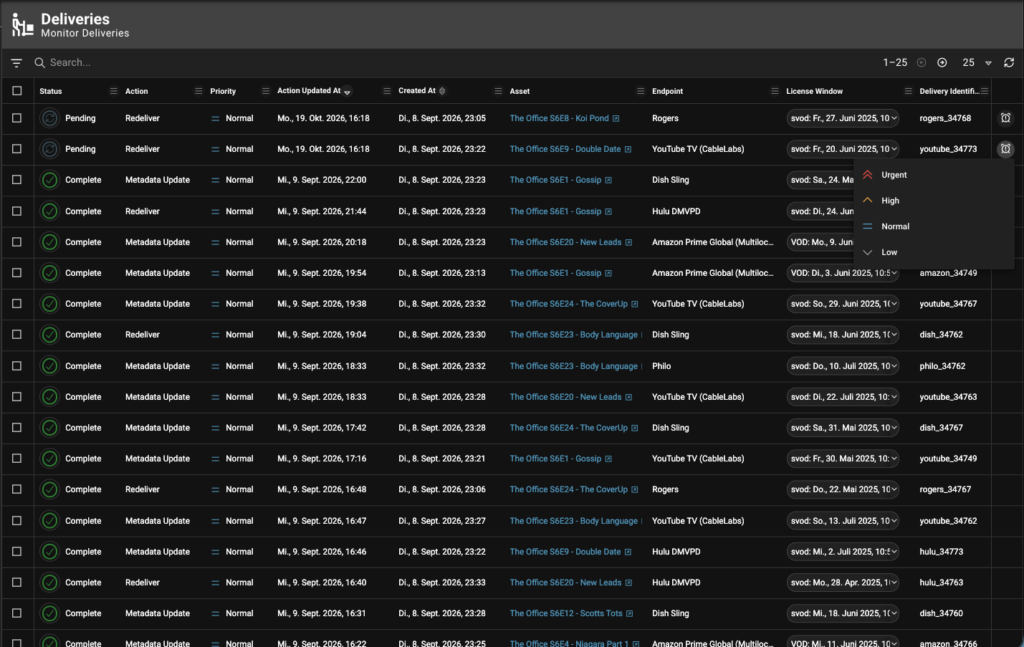
Operators can now see and set the priority of a Connect delivery and its delivery actions — shown as an icon and label, and as a column on the Delivery list — and change it through a Set Priority action, bringing deliveries in line with how priority already works on workflows and jobs. This enables operators to expedite urgent deliveries ahead of routine work when the system is under load. Priority can be changed while a delivery is in flight, and each delivery reflects the priority of its latest delivery action.
Deliveries: Relative License Window Filtering and Delivery Cancellation
The license window Start and End filters on the Deliveries page now offer relative dates — last or next 7, 14, and 30 days — alongside specific calendar dates, bringing them in line with how date filtering already works on the Jobs page. A relative selection stays relative, re-evaluating as time passes rather than freezing to the dates chosen, so a view such as “deliveries with a license window in the next 30 days” keeps working without anyone re-entering dates, and it persists in the shareable URL. The Start and End filters are now grouped under “License Window,” with the single-date filter renamed “In License Window On.”
Operators can now cancel a delivery that is no longer needed, either per row from the Deliveries list or in bulk via multi-select, and from the Gateway Delivery widget. While the cancellation is processed, the delivery shows Cancelling in its header and any unfinished steps are marked as canceled, and Cancelled is available as a status filter so canceled deliveries can be reviewed later. The action is controlled by a new Cancel Deliveries permission, allowing administrators to decide who can use it.
Notifications: Longer Recipient Lists and HTML Bodies on Direct Notifications
The “To” field on notifications now accepts up to 512 characters, twice the previous limit, providing room for distribution lists that mix internal groups, individual contacts, and vendor addresses. Recipient lists that outgrew the field no longer need an external mail group maintained purely to fit within it. Existing notification configurations are unaffected.
Notifications sent with direct=True, which go out immediately rather than being collected in Rally’s internal notification queue and bulk delivered, are now sent as HTML, just like queued notifications. Formatting in the body renders properly in the recipient’s mail client instead of arriving as raw markup, so supply chain designers get consistent output whether a notification is sent immediately or through the queue.
Integration Updates
Rally: API Token Management and Service Accounts
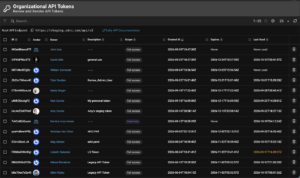 Rally now offers a rebuilt API token experience across the organization, user, and service account levels, backed by hashed token storage. A token’s full value is shown once at creation and never again, and each token carries a description, scope, expiry, and last-used date so administrators can see at a glance which tokens exist and which are still in use.
A dedicated Review and Revoke API Tokens page for the organization supports searching by description or token ID; filtering by scope, expiry, and exact ID; sorting; and permission-aware bulk revoke. Individual users manage their own tokens from a personal page with preset expiry options capped by the organization maximum. Two new organization settings — Maximum API Token Lifetime and API Token Idle Days — allow administrators to set those boundaries centrally, and each account is capped at five active tokens, with a clear dialog notification when that limit is reached. Tokens are identified throughout the interface by their token ID rather than their value, and tokens created under the previous system continue to work with their existing masked-value reveal.
Service accounts are now a customer-facing resource with their own entry in the Administration menu, managed separately from users. Administrators can search, filter, and edit service accounts from a dedicated table. They can create a new service account through a two-panel dialog that captures the account’s details — with a duplicate-name check keeping similar accounts distinguishable from one another — and mints its first API token in a single step. Each service account supports up to five tokens, minted and revoked directly from the account editor, giving automation and integration credentials the same lifecycle and expiry controls as tokens held by people.
Rally now notifies administrators when a service account API token is within seven days of expiring or of being automatically revoked due to inactivity, thereby allowing credentials to be rotated before an automated workflow stops. The notification is sent daily while any token in the organization is inside that window. Because the notification is kept generic, with no token names or owners, it can be routed safely to a shared mailbox. Administrators choose the recipients from the existing Email, SNS, and SQS notification presets in a new Token Expiry Notifications card on the Organization settings page. The API tokens pages also gain filters for account type (user or service account) and expiry state, so expired and soon-to-expire tokens can be viewed together, not scattered across the full list.
Rally: VPC Endpoints Tab on the Providers Page
The Providers page now includes a read-only VPC endpoints tab, listing every VPC endpoint configured for the silo, with filtering and sorting on service name, state, and region. Many Rally users connect Rally Provider instances to their own infrastructure — on-premises storage, licensed tools, or private services — over AWS PrivateLink, and confirming which endpoints were in place previously meant raising a request to SDVI. Because administrators themselves can now see the endpoint names and IDs for Provider instances that connect to customer-hosted infrastructure, they can more quickly verify connectivity and plan new integrations.
Rally: Support for S3 Multi-Region Access Points
Rally now supports AWS S3 Multi-Region Access Points, which present content held in buckets across several AWS regions behind a single endpoint. A storage location can be configured against an access point so that files are listed, uploaded, and read through the region closest to whoever is working with them, and Accurate Work Orders issue their pre-signed URLs against the same endpoint. This shortens the path to the media, without the need for duplication, for content distributed across regions and reviewed by ops teams in different territories.
SDVI Mover: S3 Access Point ARNs in External Storage URIs
Pairing naturally with newly introduced support for S3 Multi-Region Access Points, a further Rally update this quarter allows SDVI Mover to accept S3 Access Point ARNs in the externalStorage URI, in addition to standard bucket references. Many organizations use S3 Access Points to give each application, partner, or team its own controlled entry point into a shared bucket, with dedicated permissions and network restrictions. Previously, because Mover could address only the bucket directly, organizations had to work around those controls. Now operators can route transfers through S3 Access Points, aligning with the access-control and routing conventions already in use to manage their S3 storage.
Application Services Updates
 Rally: Hybrik Response Available in Debug Logging
The Hybrik response is now captured as a job artifact whenever the Hybrik connector log level is set to debug, not just when a job fails on the Hybrik side. Transcode issues don’t always surface as a Hybrik failure; a job can complete but produce unexpected output or fail later in the supply chain because of how the transcode was configured. With the raw response available on every debug run, operators and supply chain engineers have the full picture of what Hybrik returned so they can troubleshoot transcode jobs and fine-tune presets faster, regardless of where the job failed.
SDVI Mover: Aspera CLI Download Support
Rally can now download content using the Aspera CLI (ascp) as a step in a supply chain, covering partners that issue per-transfer Aspera credentials through an API and mandate ascp as the only supported download method. The connection parameters — Aspera source, file name, transport token, remote user, and remote host — are supplied dynamically at job time, so one preset serves every transfer rather than needing one per file. The Aspera SSH key is read from the Rally Secret Store. Downloaded content lands in a Rally storage location ready for onward processing, allowing ingest from these partners to be automated from end to end rather than handled outside Rally.
Provider: BitPress Integration
Rally now integrates with BitPress, making its AudioPress service available as a provider. AudioPress automatically conforms alternate audio — foreign language, music, and effects — to a master reference track, so supply chain designers can build audio conforming into their supply chains as an automated step rather than route content out for manual processing. This service is especially useful for teams preparing back catalog for new international markets, a project type for which the volume of audio conform work is often the bottleneck.
Rally: Voithru Provider Integration
Rally now supports media localization specialist Voithru as a provider, making its automated quality control for Japanese subtitles available as a task within a Rally supply chain. Voithru’s subtitle tooling checks for issues, such as incorrect vertical character positioning and malformed Japanese characters, that general-purpose QC does not catch. Its results are returned as time-based metadata, so a manual task can follow the automated pass. Rather than review the whole subtitle file by hand, QC operators can verify each finding against the content, focusing the manual work on areas that need human judgment. This provider integration covers a QC operation today, with further Voithru operations to follow.
Rally: Auphonic Provider for Automated Audio Post-production
Rally now supports Auphonic as a provider, making automated audio post-production available directly within a supply chain. Auphonic capabilities include speaker leveling, cough and noise removal, loudness correction, speech-to-text, and show notes generation. Because productions can be started and monitored, and their outputs collected as part of a workflow, audio that previously had to be uploaded and processed by hand through Auphonic’s own interface now can be handled without operator intervention. Auphonic automation is particularly useful for podcast and other spoken-word workflows, where the same corrective steps are applied to every episode.
—
To learn more about any of these Rally enhancements or to see them in action, please contact the SDVI team to schedule a demo.