Media supply chains rarely stop at the company boundary. Post houses, localization vendors, contractors and distribution partners all need to work on the same content, often in the same system. The redesigned single sign-on (SSO) flow in the SDVI Rally platform makes that easier. It brings single sign-on for partners, with no need to add them to your own directory.
Key Takeaways
- Rally SSO now supports OpenID Connect alongside SAML 2.0, so customers can connect Okta, Microsoft Entra ID and other standards-based identity providers.
- One identity provider configuration can serve multiple Rally organizations and multiple email domains, replacing the legacy one-application-per-organization model.
- Single sign-on for partners: vendors and contractors reach specific Rally organizations by email domain, outside your own directory.
- Users who belong to several Rally organizations can switch between them mid-session without signing in again.
- A dedicated Single Sign-On page gives Rally administrators one place to manage domains, providers and login attempts, including migration from legacy SAML.
What Changed in Rally Single Sign-On?
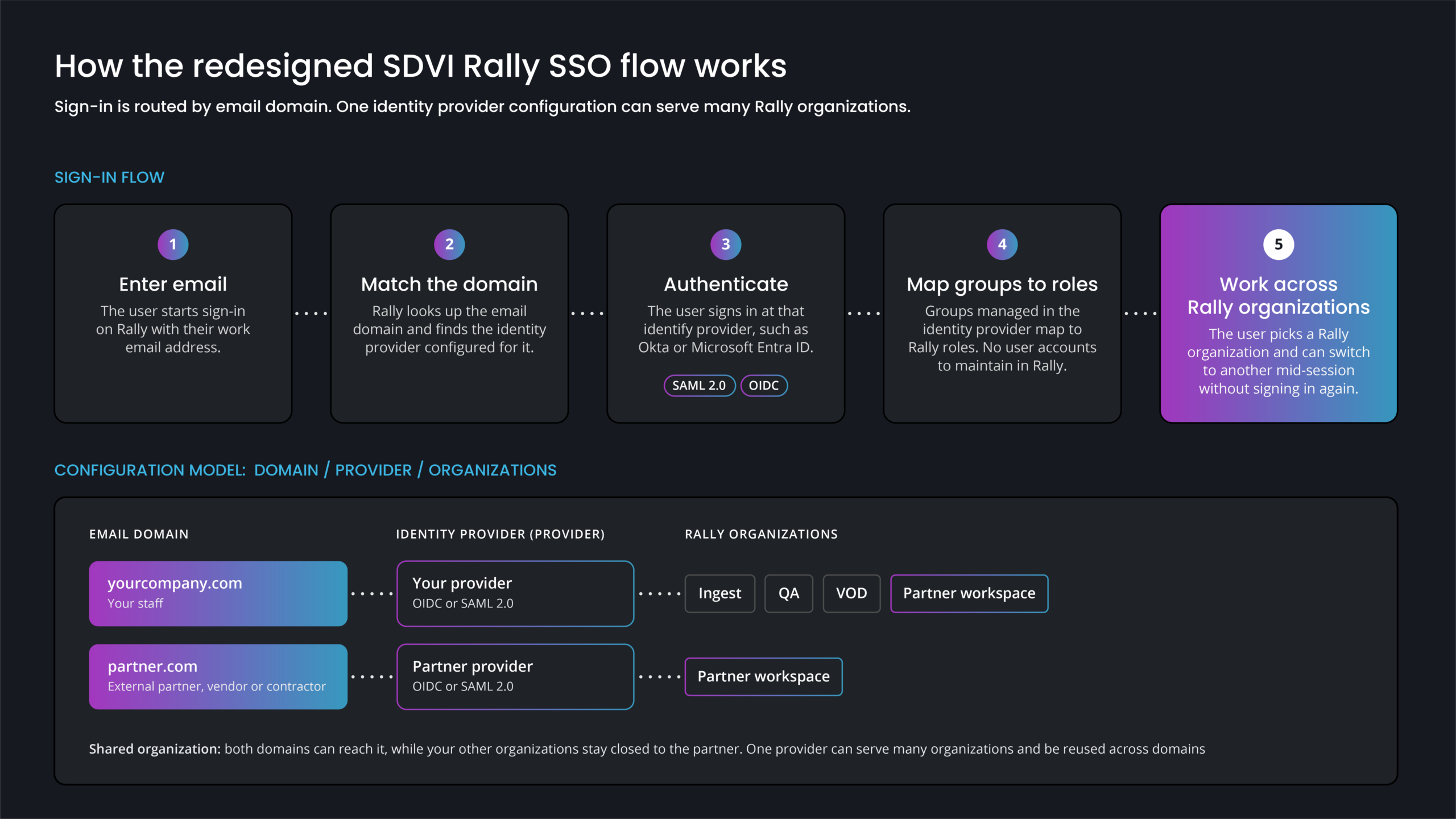
Rally now routes sign-in by email domain rather than by company. Each domain points to an identity provider configuration. A single configuration can serve multiple Rally organizations, and you can reuse it across multiple domains.
Until now, giving an outside contributor access to Rally usually meant adding them as an identity in your own directory. In addition, each “Rally organization” (a separate space within your silo, with its own users, roles and content) needed its own SAML application. That model created extra overhead for IT, an extra governance question for security, and extra friction for the people trying to get the work done.
OpenID Connect Alongside SAML 2.0
Alongside SAML 2.0, Rally now supports OpenID Connect (OIDC), the OAuth 2.0-based standard widely adopted by cloud-native applications. As a result, teams can connect Okta, Microsoft Entra ID or another standards-based identity provider using the protocol that fits their environment. Users and groups stay in the identity provider, and Rally maps their email domains to the Rally organizations they can access.
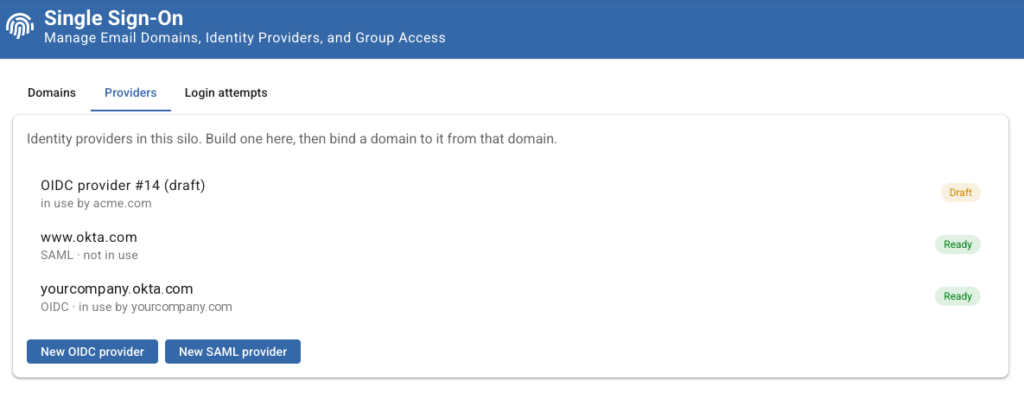
How Do You Set Up Single Sign-On for Partners?
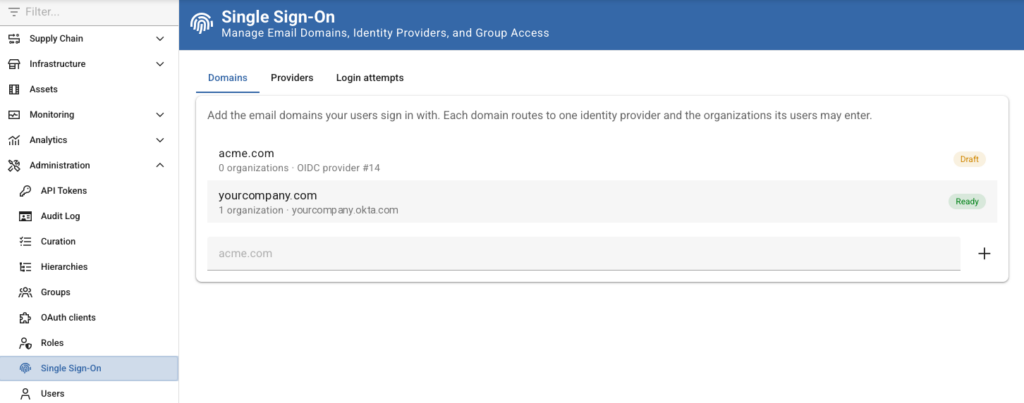
Bringing a partner on board is now a configuration step, not a directory change. On the Single Sign-On page, an administrator:
- Adds the partner’s email domain.
- Routes that domain to an identity provider configuration.
- Chooses which Rally organizations the partner can reach.
That’s single sign-on for partners without adding them to your own directory.
What Changes for Users and Administrators?
The day-to-day benefits show up on both sides of the login screen.
Switching Organizations Without Signing In Again
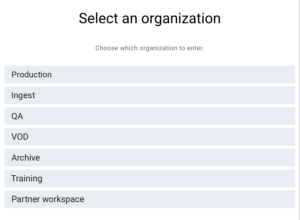
People who work in more than one Rally organization can switch between them mid-session without signing in again. That keeps operators and contractors moving across ingest, QA and distribution work.
One Page for Rally SSO Administration
Administrators get a dedicated Single Sign-On page in Rally that brings email domains, providers, and login attempts into one place. The customer’s own team can now manage Rally SSO directly. Examples include adding a contractor group, rotating a client secret, or opening a new Rally organization to an existing provider.
Getting Started with Rally SSO
New Rally silos start with a guided self-serve flow. A setup link from your SDVI Technical Account Manager opens a self-serve page where your administrators configure SSO and sign in first. They then extend access to the rest of your team. Existing customers can move from legacy SAML to the new model from the same page. Their current configuration stays in place as a fallback during the transition.
A Shared Workspace Across Company Boundaries
What this makes possible is a media supply chain that works like a shared workspace across company boundaries. A content owner can stand up a dedicated Rally organization for a co-production partner, a localization vendor, or a licensee. With SSO for partners, it can grant access by email domain and keep each of its other Rally organizations closed, while identity and access stay governed in the identity provider rather than in yet another user list. As more of the industry’s work happens between companies rather than inside them, this is the kind of access model a cloud-native media supply chain requires.
Single Sign-On for Partners: FAQs
Which identity providers does Rally SSO support?
Rally supports both SAML 2.0 and OpenID Connect (OIDC). That means you can connect Okta, Microsoft Entra ID or another standards-based identity provider, using whichever protocol fits your environment.
Do partners need accounts in our own directory?
No. Rally routes sign-in by email domain, so you add the partner’s domain and choose which Rally organizations it can reach. The partner’s users stay in their identity provider.
Can one identity provider serve several Rally organizations?
Yes. A single identity provider configuration can serve multiple Rally organizations, and you can reuse it across multiple email domains.
How do existing customers move from legacy SAML?
Administrators migrate from the Single Sign-On page in Rally. Their current SAML configuration stays in place as a fallback during the transition.
To set up single sign-on for your partners, contact your SDVI Technical Account Manager.